mnemonic: Persistent Memory System for Claude Code
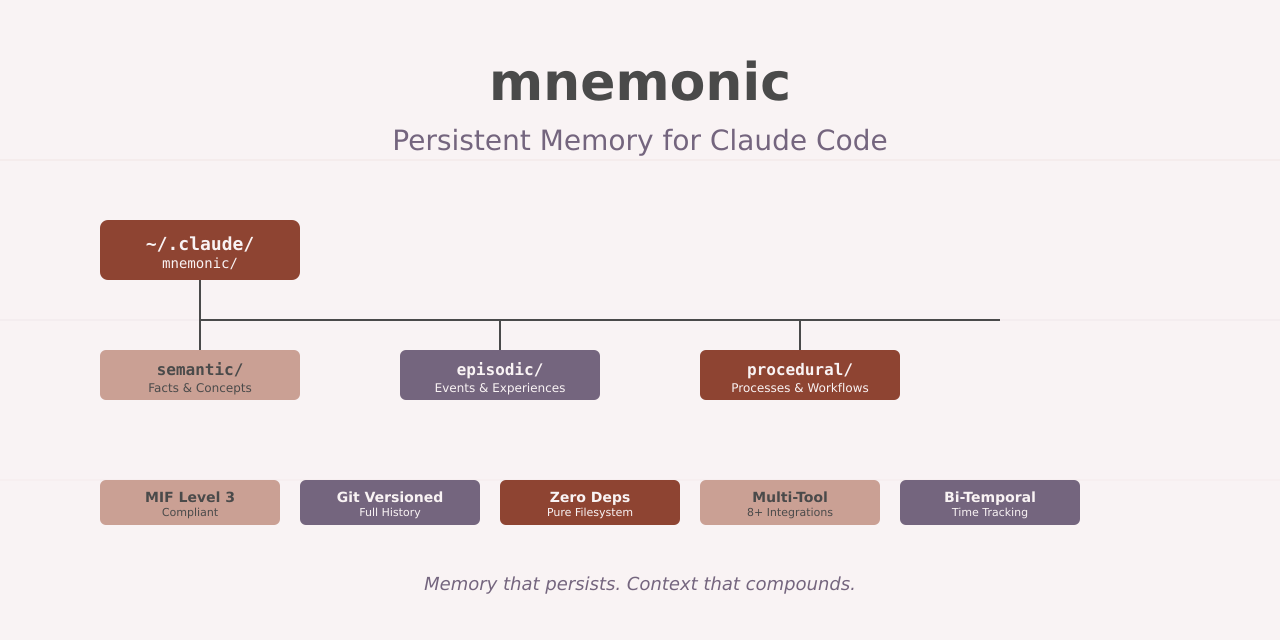

If you’ve used AI coding assistants for any length of time, you know the frustration. You explain your architecture once. Then again. And again. Every new session starts from zero, like teaching the same lesson to a student with amnesia.
Mnemonic fixes this with a pure filesystem approach: markdown files with YAML frontmatter, git versioning, and zero external dependencies. Your AI assistant remembers decisions, patterns, and context across sessions without databases, cloud services, or subscription fees.
Note: Mnemonic is an experimental project actively exploring persistent memory patterns for AI coding assistants. The implementation and APIs may evolve as we learn what works best.
Why Memory Matters
AI coding assistants lose context between sessions. You document a decision in one conversation, then watch the AI suggest the exact opposite approach a week later. The problem compounds on teams where different developers work with the same codebase but isolated AI conversations.
Traditional solutions require external services:
- Vector databases that query cloud APIs
- Graph databases with complex setup
- Proprietary memory systems tied to specific platforms
These add dependencies, cost, and operational complexity. Worse, they treat memory as a black box, hiding what the AI knows and making debugging impossible.
The Filesystem Advantage
Research validates the counterintuitive truth: filesystems outperform specialized memory systems. In Letta’s LoCoMo benchmark, filesystem-based memory achieved 74.0% accuracy compared to graph-based approaches at 68.5%.
The explanation is simple. LLMs train on vast corpora of filesystem operations. They understand grep, find, and file structures from millions of examples. This built-in knowledge makes simple tools more reliable than purpose-built knowledge graphs or vector databases.
Mnemonic takes this insight and runs with it. All memories live in ~/.claude/mnemonic/ as markdown files. Search uses ripgrep. Versioning uses git. No external services. No cloud dependencies. Just Unix tools and files.
Memory Structure
Mnemonic implements the Memory Interchange Format (MIF) Level 3 specification. MIF defines a portable, human-readable format for AI memory that works across systems and agents.
Each memory is a .memory.md file with YAML frontmatter:
---
id: 550e8400-e29b-41d4-a716-446655440000
type: semantic
namespace: decisions/project
created: 2026-01-23T10:30:00Z
modified: 2026-01-23T14:22:00Z
title: "Use PostgreSQL for storage"
tags:
  - database
  - architecture
temporal:
  valid_from: 2026-01-23T00:00:00Z
  recorded_at: 2026-01-23T10:30:00Z
  decay:
    model: exponential
    half_life: P7D
    strength: 0.85
provenance:
  source_type: conversation
  agent: claude-opus-4
  confidence: 0.95
---

# Use PostgreSQL for Storage

We decided to use PostgreSQL for our data storage needs.

## Rationale
- Strong ACID compliance
- Excellent JSON support
- Mature ecosystem
The format is deliberately simple. You can read it with cat, edit it with vim, and version it with git. No specialized tools required.
Three Types of Memory
Mnemonic organizes memories into three cognitive types:
Semantic memory stores facts, concepts, and specifications. API documentation, configuration values, architectural decisions. Things that stay relatively stable over time.
Episodic memory captures events and experiences. Debug sessions, deployment incidents, production issues. Things that happened at specific times.
Procedural memory documents processes and workflows. Deployment procedures, testing strategies, migration steps. How to do things.
This taxonomy comes from cognitive science and maps naturally to software development. When you need to remember why you chose PostgreSQL, that’s semantic memory. When you need to recall how the last deployment went wrong, that’s episodic. When you need the exact steps to run migrations, that’s procedural.
Namespaces and Organization
Memories live in a three-level hierarchy:
~/.claude/mnemonic/
├── {org}/                      # Organization-level
│   ├── semantic/decisions/     # Org-wide decisions
│   └── {project}/              # Project-specific
│       ├── semantic/decisions/
│       ├── episodic/incidents/
│       └── procedural/runbooks/
This structure provides natural scoping. Project-specific memories stay isolated. Organization-level knowledge gets shared across projects. The filesystem structure itself encodes the memory hierarchy.
Bi-Temporal Tracking
MIF includes bi-temporal awareness: valid time versus recorded time.
Valid time is when something became true in the real world. You decided to use PostgreSQL on January 15th.
Recorded time is when you documented that decision. You wrote the ADR on January 23rd.
This distinction matters for understanding your project history. You can query “what did we know on January 20th” and get accurate results even for decisions documented later.
The temporal metadata also enables decay modeling. Recent memories get higher relevance scores than old ones. The exponential decay formula follows the Ebbinghaus forgetting curve, mimicking how human memory works.
Proactive Behavior
After running /mnemonic:setup, Claude automatically:
- Searches for relevant memories when you start discussions
- Captures decisions and patterns without explicit commands
- Updates existing memories when information changes
The proactive behavior uses hooks to monitor Claude’s workflow:
# SessionStart hook
if memory_count > 0:
    health_score = calculate_health_score()
    return f"Memory system active. {memory_count} memories loaded. Health: {health_score}%"

# UserPromptSubmit hook
if detect_decision_keywords(prompt):
    return "Consider capturing this decision with /mnemonic:capture"
Hooks provide context to Claude through additionalContext. Claude decides when to read memories or trigger captures based on that context. This keeps the AI informed without requiring manual memory management.
Search Patterns
Search uses standard Unix tools:
# Full-text search
rg -i "authentication" ~/.claude/mnemonic/ --glob "*.memory.md"

# Search by namespace
rg "pattern" ~/.claude/mnemonic/*/semantic/decisions/ --glob "*.memory.md"

# Search by tag
rg -l "^  - security" ~/.claude/mnemonic/ --glob "*.memory.md"

# Recent memories (last 7 days)
find ~/.claude/mnemonic -name "*.memory.md" -mtime -7
The /mnemonic:search-enhanced command provides agent-driven iterative search. An autonomous search agent refines queries, synthesizes results, and returns summarized answers. This handles complex queries that need multiple search passes.
Custom Ontologies
Extend mnemonic with domain-specific entity types and relationships. An ontology file defines:
- Custom sub-namespaces (architecture, components, deployments)
- Typed entities (technology, component, design-pattern, runbook)
- Entity relationships (depends_on, implements, caused_by, resolves)
- Discovery patterns for auto-suggesting entity captures
Copy the software-engineering ontology:
cp mif/ontologies/examples/software-engineering.ontology.yaml \
   ~/.local/share/mnemonic/ontology.yaml
Now mnemonic understands your domain model. When Claude detects a component definition or sees a technology stack, the discovery patterns trigger entity capture suggestions.
Multi-Tool Support
Mnemonic works beyond Claude Code:
- GitHub Copilot:
.github/copilot-instructions.mdwith memory patterns - Cursor:
.cursor/rules/mnemonic.mdcfor memory awareness - Aider:
CONVENTIONS.mdwith memory context - Continue Dev:
config.yamlrules for memory integration - Windsurf: Memories loaded as rules
Each integration uses the tool’s native configuration system. The memories themselves stay tool-agnostic in the filesystem. Switch between coding assistants without losing context.
Git Versioning
Every memory change commits to git:
cd ~/.claude/mnemonic
git log --oneline -20
git show HEAD~3:path/to/memory.memory.md
This provides full audit trails. You can see when decisions changed, who recorded them, and what the previous versions said. Diffs show exactly what information got added or modified.
For teams, git enables memory sharing. Push to a shared repository, and everyone gets the same organizational knowledge. Pull before starting work to sync the latest decisions and patterns.
Blackboard Pattern
The blackboard enables cross-session coordination:
# Current session writes progress
echo "## Task: Refactoring auth module" >> ~/.claude/mnemonic/.blackboard/active-tasks.md

# Next session reads handoff notes
tail -50 ~/.claude/mnemonic/.blackboard/session-notes.md
This handles scenarios where one session starts work and another continues. The blackboard acts as shared workspace for temporary notes that don’t belong in permanent memory.
Memory Curation
The memory curator agent handles maintenance:
- Detects conflicting memories (contradictory decisions)
- Finds duplicates (same information in multiple files)
- Manages decay (reduces relevance of old memories)
- Compresses historical memories (summarizes old episodic events)
Run the curator periodically:
/mnemonic:gc --compressThis keeps the memory system clean and performant. Old memories get summarized into compact forms. Contradictions surface for resolution. Duplicates merge into single canonical sources.
Real-World Impact
After six months using mnemonic across multiple projects:
Zero context loss between sessions: Claude recalls architectural decisions from months ago without re-explanation.
Faster onboarding: New team members read shared organizational memories and get context that normally takes weeks to acquire.
Better decisions: Historical incident memories inform current architecture choices. You remember what went wrong last time.
No vendor lock-in: Memories are portable markdown files. Switch AI assistants without losing years of accumulated knowledge.
When NOT to Use Mnemonic
Mnemonic isn’t right for every scenario:
Single-session projects: If you never revisit code, memory adds overhead without benefit.
Non-git workflows: Teams using other version control systems lose the git integration advantages.
Cloud-required environments: Some organizations mandate cloud services for audit and compliance. Filesystem-only storage might not meet those requirements.
Real-time collaboration: Multiple users editing memories simultaneously need coordination beyond what git provides.
For solo developers and small teams working primarily in local environments, though, mnemonic provides persistent memory without the complexity.
Get Started
Install mnemonic:
# Load the plugin
claude --plugin-dir /path/to/mnemonic

# Or add to settings
claude settings plugins add /path/to/mnemonic
Initialize for your project:
/mnemonic:setupCapture your first memory:
/mnemonic:capture decisions "Your architectural decision" --tags architecture,databaseFrom that point forward, Claude remembers. Decisions persist across sessions. Patterns accumulate over time. Context builds incrementally instead of resetting to zero.
Your AI coding assistant finally has a memory that works.
Links: